Manufacturing Dashboard Software
Your Process.
Your Data.
Your Vision.
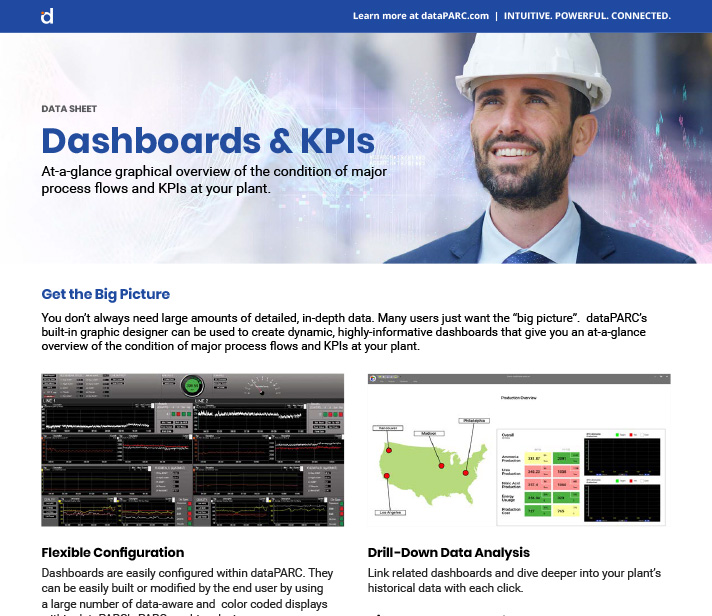
Build powerful process displays that bring your plant to life, from P&ID diagrams and data entry forms to live KPI dashboards for every level of your operation.
Create manufacturing dashboards & displays that operators trust, engineers can customize, and management can act on – all from a single unified platform.
5,000+
Industry Graphics Library
Use Existing Graphics
Legacy display converting options
Dynamic Animation
WPF / XAML compatible
Live
Real-time data binding
CREATE CUSTOM MANUFACTURING DASHBOARDS
Build Any Dashboard Your Process Needs
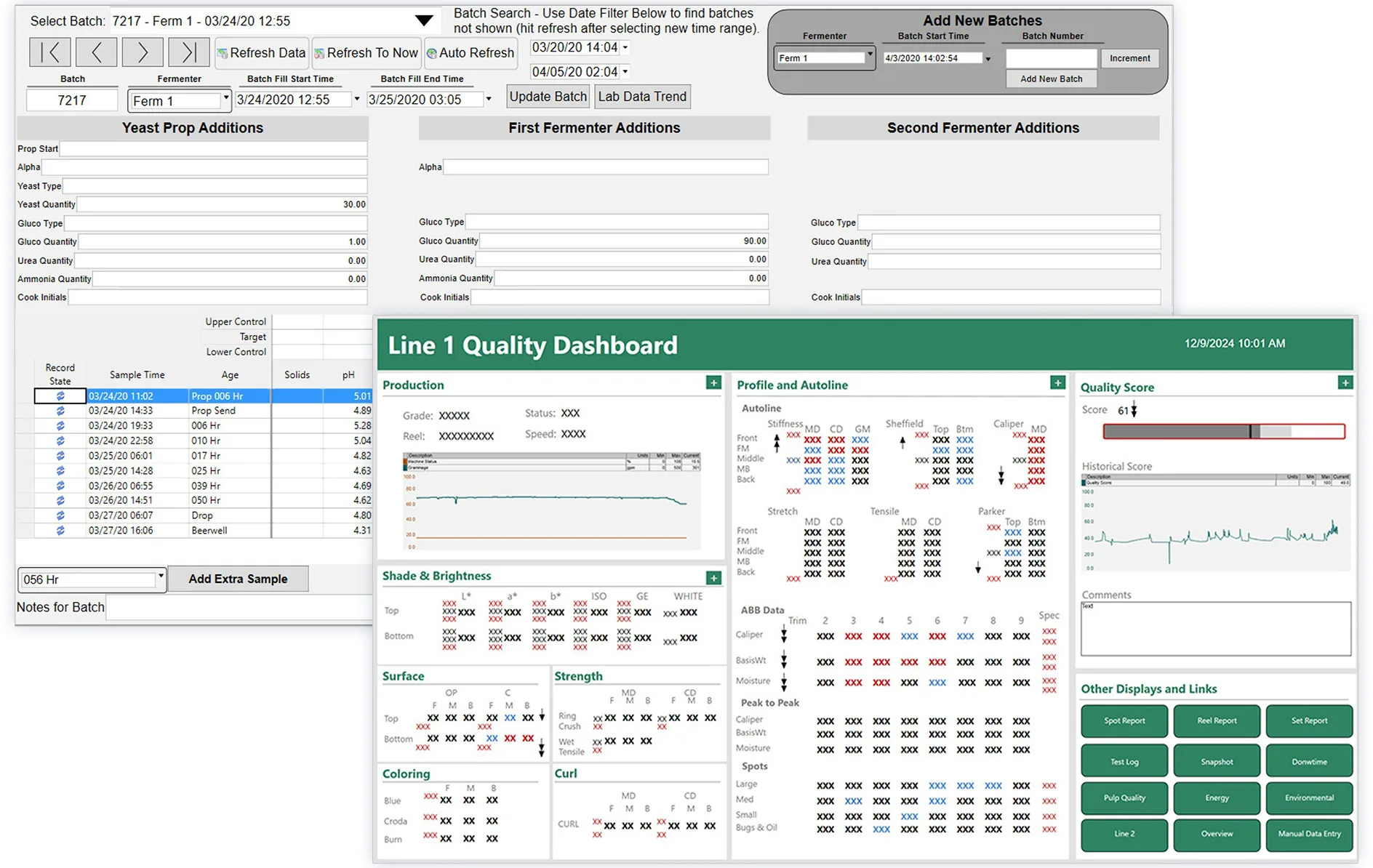
dataPARC graphics gives you a single environment for designing, deploying, and maintaining all your process displays. Mirror your existing workflows to reduce training time and get operators productive from day one.
- P&ID diagrams with live data, alarm colors, and animated flow indicators
- Process overview screens for plant-wide situational awareness
- Data entry forms that mirror your existing paper or electronic forms
- KPI dashboards with trends, gauges, and real-time aggregate values
- Use pipes to trace flow direction through complex P&ID layouts
ROLE-BASED DASHBOARDS
A Dashboard Designed for Every Level of the Plant
From the control room to the boardroom, every role in your organization gets exactly the information they need. No more, no less.
Operators
Monitor & Control
Engineering
Analyze & Optimize
Management
Review & Decide
LIVE DATA
Real-Time Manufacturing Dashboards That Think Ahead
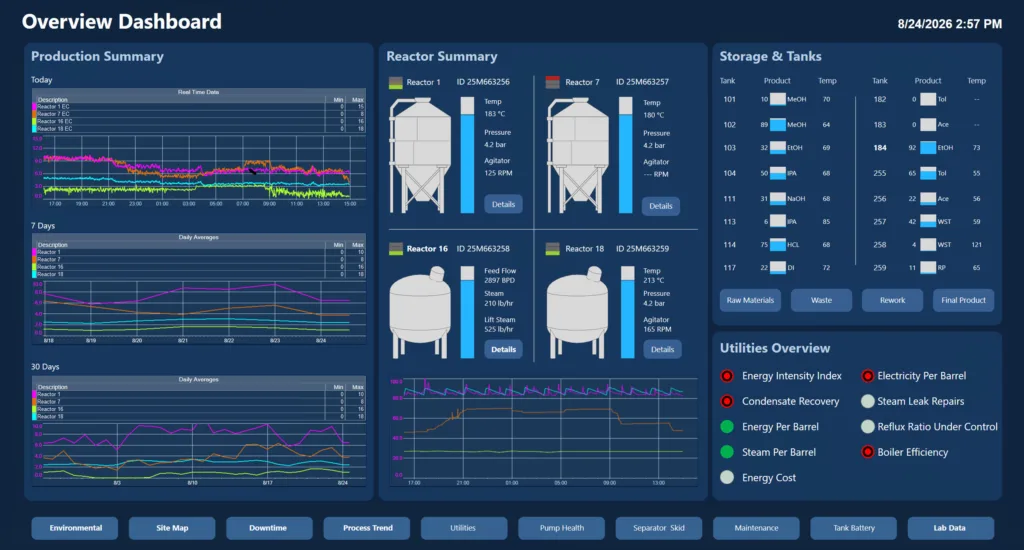
Every graphic object is bound directly to live process data. Dashboard elements update in real time as conditions change, no refresh required. Add aggregates to show weekly or monthly averages so management always has the context they need.
- Bind tag values directly to colors, positions, and sizes
- Show weekly, monthly, or custom-period averages alongside live data
- Consolidate data from multiple sites and systems into one view
- Define limits and targets, color changes when out of spec
- Double-click any tag in the dashboard to open a trend instantly
- Multi-select tags and trend them together for comparison
OBJECT LIBRARY
5,000+ Pre-Built Graphic Objects
Start every display with a massive library of industrial graphic objects. Additional controls are built on Microsoft WPF technology. Ready to bind to live process data.
pumps
tanks
valves
pipes
gauges
indicators
charts
lights
motors
heat exch
buttons
organizational
…and 5000+ more industrial objects
ADVANCED CUSTOMIZATION
Unlimited Flexibility with XAML
Go beyond the pre-built library. Full XAML code access lets your team create truly custom graphics, dashboards, interactions, and even mini-applications without limits.
- XAML Code Access
Edit the underlying XAML directly to create fully custom shapes, animations, and interactions beyond the standard library. - WPF Data Binding
Bind any WPF property: colors, visibility, position, size to live tag values for dynamic, data-driven displays. - SVG Converter
Import any SVG image and convert it into a bindable graphic element, unlocking dynamic color changes and data overlays. - Logic Controls
Build inline calculations and conditional logic directly in the display builder, then save them in PARCview for reuse.
GRAPHICS CONVERTER
Migrate Your Existing Process Displays
Don’t start from scratch. dataPARC can convert your existing process graphics & dashboards so your team’s work isn’t wasted. Contact us to check how your current system can be converted.
PI Vision & ProcessBook
AVEVA
Aspen IP.21
AspenTech
DCS Screens and More!
Contact us to check
DYNAMIC ANIMATION
Graphics That Respond to Your Process
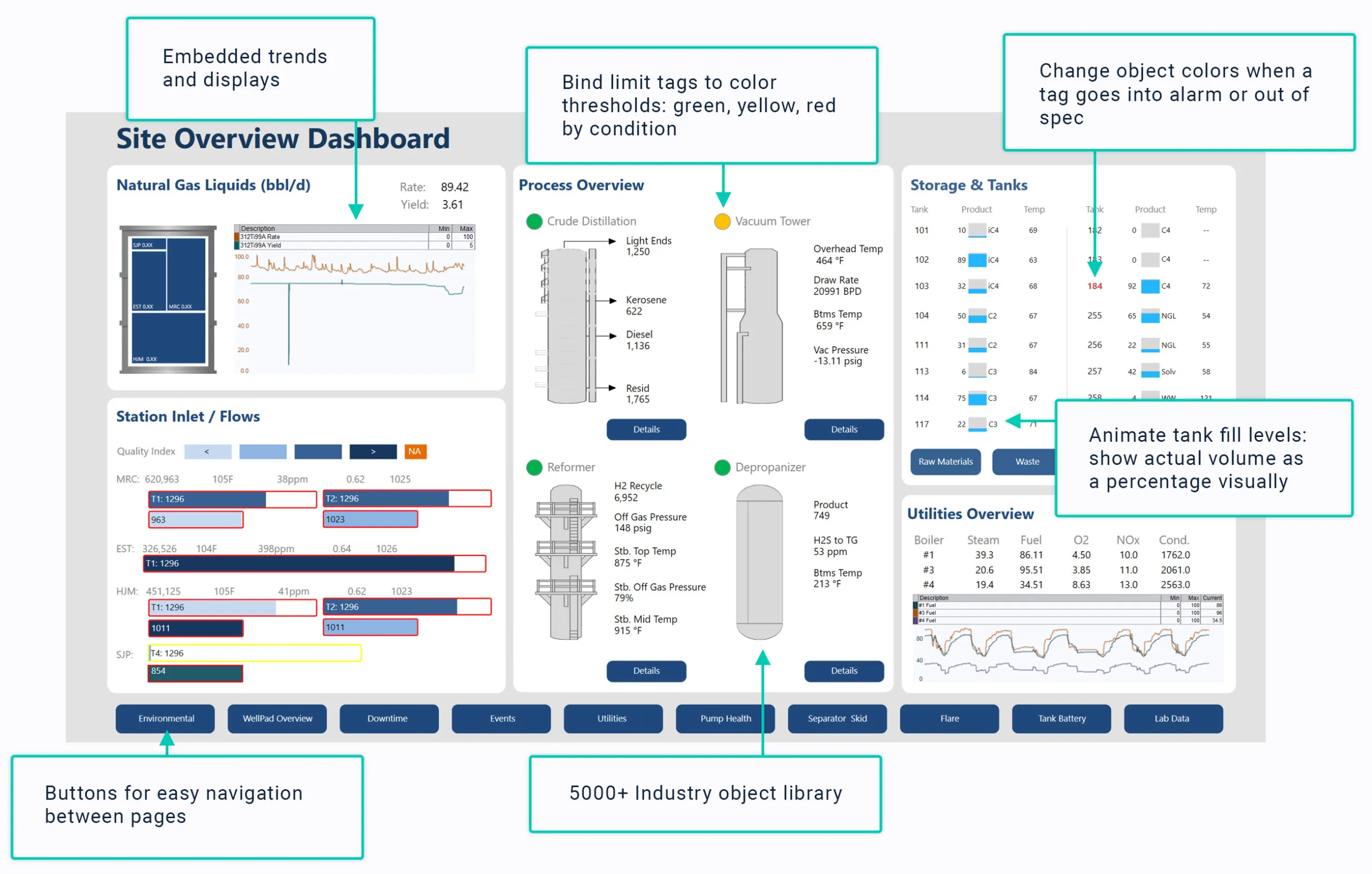
Bring your dashboards to life by binding visual properties to live tag values. Objects change color, animate, or update automatically as process conditions change, keeping operators informed at a glance.
- Animate pipe flow direction and speed based on live flow rate tags
- Rotate equipment objects (pumps, agitators) based on speed tags
- Show or hide display elements based on any process condition or logic
PARCVIEW INTERACTION
Work Smarter Inside PARCview
PARCview adds powerful built-in tools that turn your graphics into a fully interactive analysis and training environment, right from the display.
Trend Any Tag Instantly
Zoom for Detail
Playback Mode
Embedded Displays
DISPLAY BUILDER TOOLS
Tools Built for Serious Dashboard Builders
The dataPARC display builder includes professional-grade tools for alignment, testing, access control, and customization. Every display you build is accurate, polished, and production-ready.
View Data From Any Source
When building a dashboard, utilize your entire tag library. Data from any source can be mix and matched onto a single dashboard.
SVG Converter
Convert any SVG image into a bindable dataPARC graphic element, unlock dynamic color changes, data overlays, and tag binding on custom art.
Access Control
Limit who can create or edit graphics. Grant display-build permissions only to authorized users, protecting the integrity of production displays.
Logic & Calculations
Add inline logic controls to build visual calculations — show derived values on screen and save calculation definitions in PARCview for reuse.
WPF Property Binding
Leverage the full power of Microsoft WPF. Bind virtually any visual property to a tag value, from opacity and rotation to complex custom triggers.
Ready to Build Better Manufacturing Dashboards?
See how dataPARC dashboards can transform the way your plant operates — from live P&ID diagrams to role-based KPI dashboards. Book a live demo and we’ll show you exactly what’s possible for your process.